VxWorks Shell Editing and Object Module Loader Guide
🧭 Overview #
The VxWorks kernel shell provides powerful command-line editing capabilities and a dynamic object-module loader to streamline embedded development workflows. Together, these features enable faster iteration, improved productivity, and runtime extensibility without rebuilding or rebooting the system.
This guide covers advanced shell editing using VI and Emacs modes, as well as practical usage of the object-module loader with ld() and unld().
⌨️ Command-Line Editing in VxWorks #
The VxWorks shell includes built-in support for VI-style editing (default) and optional Emacs mode, along with command history and autocompletion.
Command History and Buffer #
The shell maintains a history buffer of previously executed commands:
- Default size: 20 commands
- Commands can be navigated and reused efficiently
- Buffer size can be adjusted dynamically
To increase the history size:
h 500This expands the buffer to store up to 500 commands, which is useful in complex debugging or iterative workflows.
VI Editing Mode (Default) #
VI mode is optimized for low overhead and is the default editor in the VxWorks shell.
To enter editing mode, press:
ESCNavigation and Editing Commands #
| Key | Action |
|---|---|
k |
Previous command in history |
j |
Next command in history |
h |
Move cursor left |
l |
Move cursor right |
i |
Insert before cursor |
I |
Insert at beginning of line |
a |
Append after cursor |
A |
Append at end of line |
x |
Delete character |
dd |
Delete entire line |
rc |
Replace character with c |
nG |
Jump to history entry or search |
This mode is efficient for experienced users familiar with modal editing.
🔍 Command-Line Autocompletion #
The shell supports symbol and file name completion:
CTRL + D→ List available symbolsCTRL + D, thenTAB→ Autocomplete symbols or filenames
Autocompletion relies on the symbol table, making it especially useful when working with dynamically loaded modules.
✏️ Enabling Emacs Mode #
Emacs mode provides a more familiar editing experience for users accustomed to GNU-style keybindings.
Enable it with:
shConfig "LINE_EDIT_MODE=emacs"Considerations #
- Offers richer editing features than VI
- Slightly higher runtime overhead
- Useful for developers not comfortable with modal editing
📦 Object-Module Loader in VxWorks #
The object-module loader enables runtime loading and unloading of compiled object files, eliminating the need for full system rebuilds.
Benefits #
- Rapid development and testing cycles
- Dynamic feature extension
- Reduced downtime during debugging
⚙️ Required Configuration #
INCLUDE_LOADER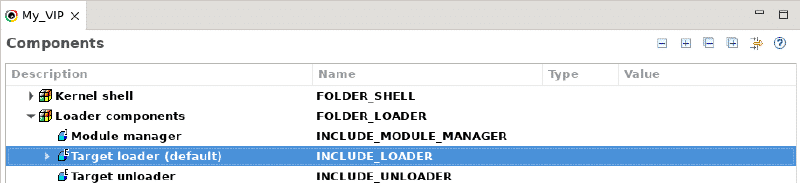
Additionally, the loader requires access to the symbol table to resolve references between modules and the kernel.
Core Loader APIs #
Loading Modules #
ld()- Loads an object module into the system
- Links symbols against the existing kernel image
- Allocates memory automatically or uses specified addresses
Unloading Modules #
unld()- Removes a previously loaded module
- Frees associated memory
- Detaches symbols from the system
⚠️ Safety Considerations #
- Do not unload a module while its tasks are still executing
- Ensure all dependent resources are released before calling
unld() - Improper unloading can lead to undefined behavior or system instability
🧠 Memory Management Behavior #
The loader supports two allocation strategies:
- Dynamic allocation: Default behavior for downloaded modules
- Static placement: User-defined memory addresses for tighter control
This flexibility is critical for constrained embedded systems where memory layout matters.
✅ Conclusion #
Mastering VxWorks shell command-line editing and the object-module loader significantly improves development efficiency in embedded systems. VI and Emacs modes provide flexible editing workflows, while ld() and unld() enable powerful runtime extensibility.
These capabilities allow developers to iterate quickly, debug effectively, and extend system functionality without costly rebuild cycles.